
DraftMD
A native Markdown editor and viewer for the Mac. Quick to write and format in, and ready for working with AI.
- Write and format fast. Formatting appears as you type. Type Markdown symbols, click the toolbar or press a shortcut, or turn on Vim mode.
- Review documents and add your comments. Edits and comments are saved right in the .md file as plain CriticMarkup, so an AI agent can read them and apply them.
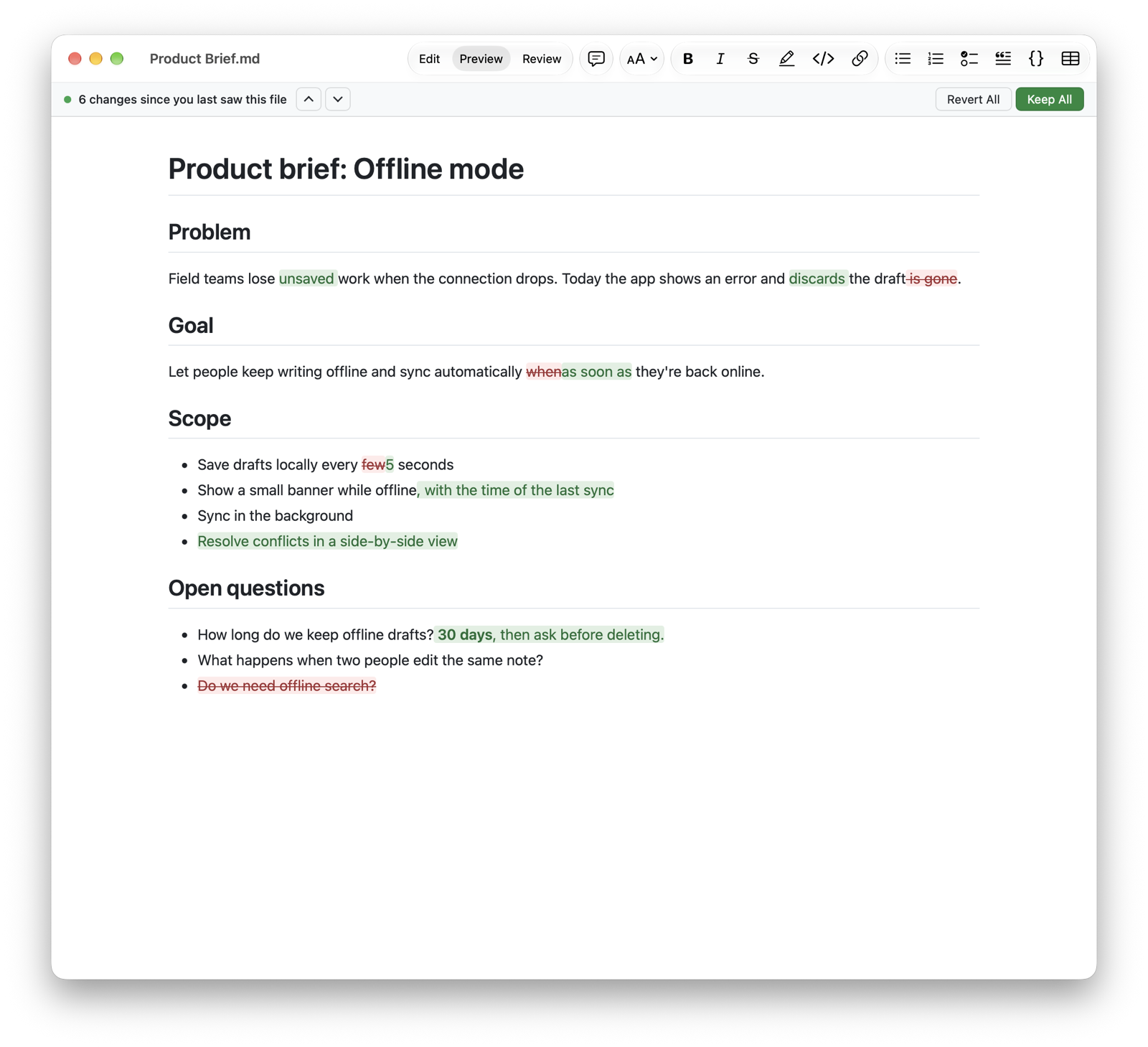
- See what changed. When an AI agent rewrites a file, DraftMD marks every change word by word. Keep or revert each one with a click.
- Styles, print and PDF. Built-in templates, light and dark, or your own with a live preview.
- Private. No account, no analytics, no tracking. Your documents never leave your Mac.
Support
Questions, bug reports and ideas are welcome. Write to draftmd@raeone.dev and I'll get back to you, usually within a few days.
If something goes wrong, please mention your macOS version and the steps that led to the problem.
Frequently asked questions
How do I review a draft from an AI?
Open the Markdown file and click Review in the toolbar (⇧⌘R). From then on, every edit you make becomes a suggestion: deleted text stays struck through and new text is highlighted. To comment, select some text and press ⌥⌘M. Remove a single suggestion with the × next to it, or all of them from the Review menu.
How does my AI see my suggestions?
DraftMD saves them in the file as CriticMarkup, a plain-text format that AI tools understand:
| You | In the file |
|---|---|
| Delete text | {--old text--} |
| Add text | {++new text++} |
| Replace text | {~~old~>new~~} |
| Comment | {==text==}{>>your comment<<} |
Then ask your AI agent to “apply the review suggestions and remove the markup”.
What is the “changes since you last saw this file” bar?
DraftMD remembers how each file looked when you last saw it. When another app changes the file, for example an AI agent, DraftMD reloads it and marks what changed: deleted text in red, new text in green. Use the arrows to jump between changes, ✓ or ✕ to keep or revert one, or Keep All and Revert All. Reverting is a normal edit, so ⌘Z brings it back.
Why does DraftMD ask for access to a folder?
Mac App Store apps can only read the files you open. When a document shows images stored in another folder, DraftMD asks once for access to that folder and remembers your choice. Allowing a parent folder, such as your Documents folder, covers every folder inside it.
Can I change how my documents look?
Yes. Open DraftMD › Settings › Styles, pick a built-in template, or click Duplicate to Edit to make your own. You can set the font, size, line spacing, text width and a color for every heading, or edit the whole style as CSS. Print (⌘P) and PDF export (⇧⌘E) use the same style.
DraftMD quit before I saved. Is my work lost?
Probably not. DraftMD backs up unsaved changes on your Mac as you type and offers them back the next time it starts. If the file changed in the meantime, the recovered text opens as a separate copy, so nothing is overwritten.
Where can I find all keyboard shortcuts?
In Help › Keyboard Shortcuts, and in Settings › Keyboard Shortcuts. Every Markdown command has one: for example ⌘B for bold, ⌃1 to ⌃6 for headings and ⌥⌘T for a table.
What do I need to run DraftMD?
A Mac with macOS 14 Sonoma or later. DraftMD runs natively on Apple silicon and Intel Macs and is available in English and Czech.